
Purchase and Sales Voucher Entries with 5% VAT in Tally Prime (Step-by-Step Guide)
📌 Executive Summary & Key Rules
- Segregate Duties & Taxes: Always maintain separate ledgers for Input VAT 5% (purchases / asset) and Output VAT 5% (sales / liability). Never merge them into a single tax account.
- Use Native Vouchers: Record purchases exclusively in F9 and sales in F8. Bypassing them with journal vouchers damages statutory VAT 201 reports.
- Pre-Tax Discount Logic: Under UAE tax regulations, trade discounts must be subtracted first; 5% VAT applies only to the net reduced taxable balance.
- Automated Tax Calculations: Proper rate configuration in item masters ensures error-free computations and instant invoice generation.
Quick Navigation • Step-by-Step Walkthrough
Every commercial enterprise in Dubai and the wider UAE buys and sells daily. The operational challenge for finance teams is recording those transactions accurately, with VAT separated out correctly, so your trial balance, profit & loss, and statutory tax filings remain audit-proof at the end of each period.
Tally Prime handles this seamlessly through its dedicated voucher architecture. Once you understand the fundamental accounting mechanics of purchase and sales vouchers, everyday commercial postings become fast, intuitive, and routine.
This practical guide walks through recording purchase and sales entries in Tally Prime with 5% VAT using realistic UAE Dirham (AED) examples, covering journal mechanics, keyboard workflows, and trade discounts.
Prerequisites: Setting Up VAT and Ledgers in Tally Prime
Before recording your first voucher, ensure your foundational master ledgers are configured properly:
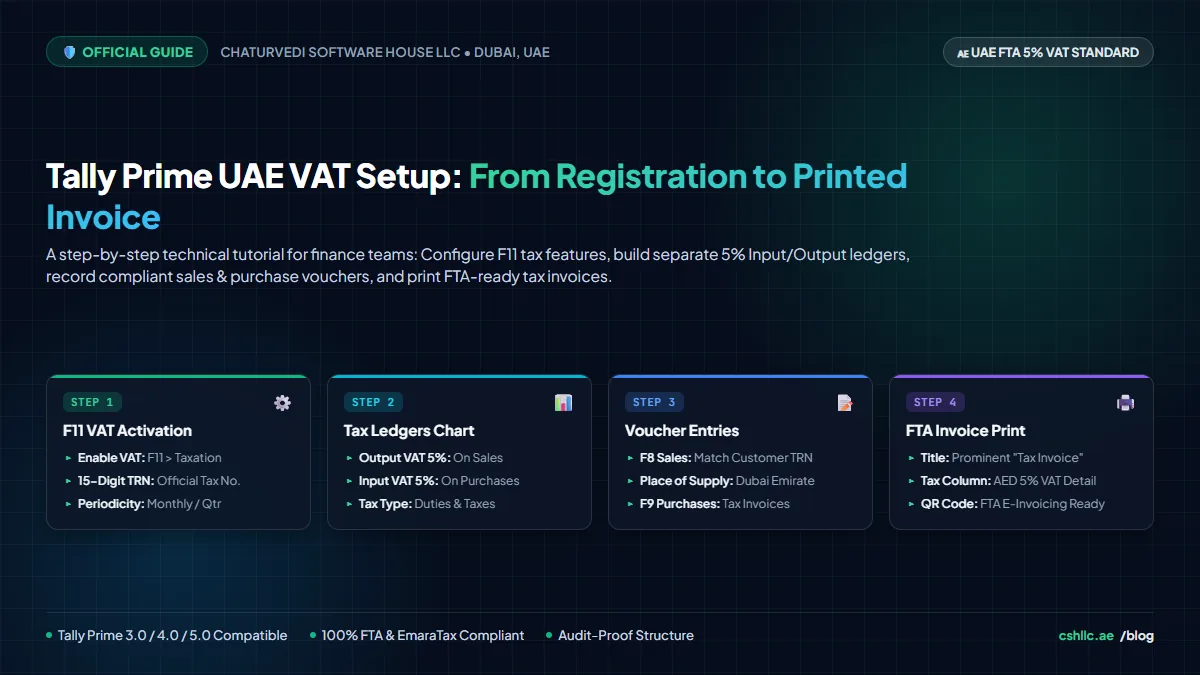
- Enable UAE VAT Features (F11): Press F11 from the Gateway of Tally, enable VAT, and enter your company’s 15-digit Tax Registration Number (TRN) and return filing frequency.
- Segregated Tax Ledgers: Create two separate accounts under Duties & Taxes:
Input VAT 5%: Used exclusively on purchase bills (treated as a current asset/tax credit).Output VAT 5%: Used exclusively on sales tax invoices (treated as a current tax liability).
- Party Ledgers: Suppliers are classified under Sundry Creditors (with their 15-digit TRN and Emirate), while customers belong under Sundry Debtors.
- Discount Ledger: Create
Discount Allowedunder Indirect Expenses to track client price reductions cleanly.
What Is a Purchase Voucher (F9)?
A Purchase voucher (F9) records goods or services acquired from commercial vendors. It captures supplier identity, invoice numbers, item specifications, quantity, taxable value, and the statutory 5% Input VAT.
Purchase Entry in Tally Prime with 5% VAT
Consider a standard credit purchase scenario for a Dubai trading business:
- Vendor: ABC Traders LLC
- Value of Goods: AED 10,000
- Input VAT at 5%: AED 500
- Total Bill Payable: AED 10,500
| Particulars | Debit (AED) | Credit (AED) | Accounting Logic |
|---|---|---|---|
| Purchase A/c | 10,000.00 | — | Expense/Asset increased (Inventory cost) |
| Input VAT A/c (5%) | 500.00 | — | Tax asset increased (Recoverable credit) |
| ABC Traders LLC (Creditor) | — | 10,500.00 | Liability increased (Total amount payable) |
| Total | 10,500.00 | 10,500.00 | Perfect Balance |
How to Record the Purchase in Tally Prime:
From Gateway of Tally, navigate to Vouchers and press F9 (Purchase).
Enter the supplier’s original tax invoice number and date in Supplier Invoice No.
In Party A/c Name, choose ABC Traders LLC. Tally displays their saved 15-digit TRN and address.
Select your standard Purchase Ledger (tagged with 5% VAT rate).
Enter the stock item, quantity, and rate to arrive at the AED 10,000 subtotal.
Move below the item line and select the Input VAT 5% ledger. Tally automatically calculates AED 500.
Verify the grand total matches the physical supplier bill (AED 10,500), add a brief narration, and press Ctrl + A to save.
Master Voucher Navigation in Tally Prime
Tally Prime organizes all financial accounting through standardized functional keys. Using the right voucher ensures transactions flow into the appropriate statutory tax reports:
| Key | Voucher Type | When to Use | VAT Reporting Impact |
|---|---|---|---|
| F4 | Contra | Cash deposits, cash withdrawals, inter-bank transfers | Zero VAT impact |
| F5 | Payment | Cash/bank disbursements, vendor settlements, expense payments | Records payment settlements |
| F6 | Receipt | Customer collections, bank inflows, advance payments | VAT on advance receipt |
| F7 | Journal | Depreciation, year-end adjustments, bad debt write-offs | Adjustments & RCM |
| F8 | Sales | Tax invoices issued to clients (B2B, B2C, Exports) | Feeds Box 1–8 in VAT 201 |
| F9 | Purchase | Vendor bills for inventory, raw materials, capital assets | Feeds Box 9–11 in VAT 201 |
Sales Entry in Tally Prime with 5% VAT
A Sales voucher (F8) records commercial revenue. It tracks the customer, revenue earned, and the 5% Output VAT collected on behalf of the Federal Tax Authority (FTA).
Example: Credit sale to XYZ Customer LLC:
- Gross Sale Value: AED 20,000
- Output VAT at 5%: AED 1,000
- Total Invoice Amount: AED 21,000
| Particulars | Debit (AED) | Credit (AED) | Accounting Logic |
|---|---|---|---|
| XYZ Customer LLC (Debtor) | 21,000.00 | — | Current asset increased (Total receivable from client) |
| Sales A/c | — | 20,000.00 | Revenue earned (Net company income) |
| Output VAT A/c (5%) | — | 1,000.00 | Current liability increased (Tax owed to FTA) |
| Total | 21,000.00 | 21,000.00 | Balanced Entry |
Recording the Sale in Tally Prime:
- Navigate to Gateway of Tally > Vouchers and press F8 (Sales).
- Select XYZ Customer LLC under Party A/c Name. Verify the delivery note and buyer TRN details.
- Select your Sales Ledger.
- Enter stock items, quantity, and unit rate totaling AED 20,000.
- Below the item divider, append the Output VAT 5% ledger. Tally automatically calculates AED 1,000.
- Confirm invoice grand total is AED 21,000.
- Press Ctrl + A to save and generate the FTA-compliant printed tax invoice.
Sales Entry with Trade Discount (Pre-Tax Calculation)
Commercial discounts are frequent in UAE B2B commerce. Under UAE VAT law, trade discounts affect the taxable value: the discount must be deducted first, and 5% VAT is charged strictly on the reduced amount.
Example: Sale with AED 1,000 Trade Discount:
- Gross Value: AED 20,000
- Discount Allowed: AED 1,000
- Taxable Base Value: AED 19,000
- 5% VAT on AED 19,000: AED 950
- Net Invoice Payable: AED 19,950
| Particulars | Debit (AED) | Credit (AED) | Financial Impact |
|---|---|---|---|
| Customer A/c | 19,950.00 | — | Net cash receivable from customer |
| Discount Allowed A/c | 1,000.00 | — | Indirect expense / commercial allowance |
| Sales A/c | — | 20,000.00 | Gross sales turnover |
| Output VAT A/c (5%) | — | 950.00 | 5% statutory tax on net AED 19,000 |
| Total | 20,950.00 | 20,950.00 | Balanced Transaction |
Recording the discount in its dedicated ledger, rather than simply suppressing the sales amount, enables management to monitor total promotional discounts across annual financial reviews.
5 Common Mistakes to Avoid in Tally Prime
Even seasoned bookkeepers encounter common pitfalls when managing high voucher volumes:
1. Blending Input and Output VAT into a Single Account
Using one general “VAT Account” causes chaotic period-end reconciliations. Always maintain separate accounts for Input VAT (purchases) and Output VAT (sales).
2. Calculating VAT Before Applying Trade Discounts
Charging tax on the gross AED 20,000 rather than the post-discount AED 19,000 results in overpaying tax to the FTA and client disputes.
3. Selecting Similar Party Ledger Names
Confusion between sister entities (e.g., “Apex Trading LLC” vs “Apex Trading FZE”) misallocates receivables and invalidates buyer TRNs.
4. Recording Inventory Sales in F7 Journal Vouchers
While journal entries balance mathematically, they bypass Tally Prime’s statutory VAT computation engines, corrupting Box 1 declarations on Form VAT 201.
5. Skipping Voucher Total Verifications
Failing to match the software total with the physical supplier bill leaves fractional rounding discrepancies that accumulate over the tax period.
Frequently Asked Questions (FAQ)
What is the difference between Input VAT and Output VAT in Tally Prime?
Input VAT is the 5% tax paid to vendors on business purchases (recorded as an asset via F9 Purchase Vouchers). Output VAT is the 5% tax collected from customers on sales (recorded as a liability via F8 Sales Vouchers). Both must be created as separate ledgers under Duties & Taxes.
How is trade discount treated under UAE 5% VAT rules?
Trade discounts must be deducted from the gross invoice amount before calculating tax. VAT at 5% applies strictly to the reduced net taxable value, never on the gross pre-discount amount.
Which keyboard shortcuts open Purchase and Sales vouchers in Tally Prime?
From the Gateway of Tally > Vouchers, press F9 to open the Purchase voucher and F8 to open the Sales voucher.
Can I record sales transactions using an F7 Journal voucher?
While a journal entry balances accounting debits and credits, it bypasses statutory sales registers and Form VAT 201 reporting. All regular commercial sales must be recorded via F8 Sales Vouchers to ensure full FTA audit compliance.
Why is my Input VAT not calculating automatically on purchase invoices?
Automatic VAT computation requires: (1) enabling VAT in F11 Features, (2) selecting ‘VAT’ under Duties & Taxes with a 5% rate, and (3) ensuring the stock item or purchase ledger has ‘Taxable at 5%’ configured in its tax rate setup.
📚 Recommended Related Guides
Explore more step-by-step Tally Prime accounting and operations playbooks